
Introduction
Picture this. You are a small business owner. You just bought five new laptops for your team. You are excited to get everyone set up. But then you see a confusing choice. Do you get Windows 11 Pro? Or do you get Windows 11 Business? You start searching online. You see many different answers. Some people say they are the same. Others say they are different.
You feel lost. You do not want to make a wrong choice. You want your team to work well. You want to keep your data safe. You also want to save money. This is a common problem for many small business owners. Let us clear up the confusion. Let us look at the Windows 11 Business vs Pro question. We will break it down in simple terms. By the end, you will know exactly what to pick. You will feel confident in your decision. Your business will benefit from the right choice.
What Exactly is “Windows 11 Business”?
Many people ask about Windows 11 Business. They see it on their new computers. They wonder what it means. The truth is simple. There is no separate edition called “Windows 11 Business”. Microsoft uses this term as a label. It is a branding choice.
It can be confusing. But do not worry. When you see “Windows 11 Business,” you are actually looking at Windows 11 Pro. Microsoft considers Windows 11 Pro a business edition. They also include Pro for Workstations and Enterprise in this group.
So the Windows 11 Business vs Pro question is a bit misleading. They are not two different things. They are the same product with different names. This is important to understand. It saves you from overthinking. You are not missing out on a special edition. You are getting the Pro version. That version is built for businesses like yours.
Understanding Windows 11 Pro for Small Business
Windows 11 Pro is the real deal for small companies. It is designed for small and medium organizations. It gives you built-in security and management tools. These tools help you protect your devices. They help you manage who can access your data. Think of Windows 11 Pro as your business partner.
It works with you to keep things running smoothly. It is not just for large corporations. It is perfect for teams of any size. Many new business laptops come with Pro pre-installed. This shows that Microsoft wants businesses to use this version. It is the standard choice for most companies. When you compare Windows 11 Business vs Pro, remember they are the same. Pro is the edition you need for your business needs.
Key Features of Windows 11 Pro
Windows 11 Pro comes with many powerful features. These features set it apart from the Home edition. Let us look at the most important ones.
-
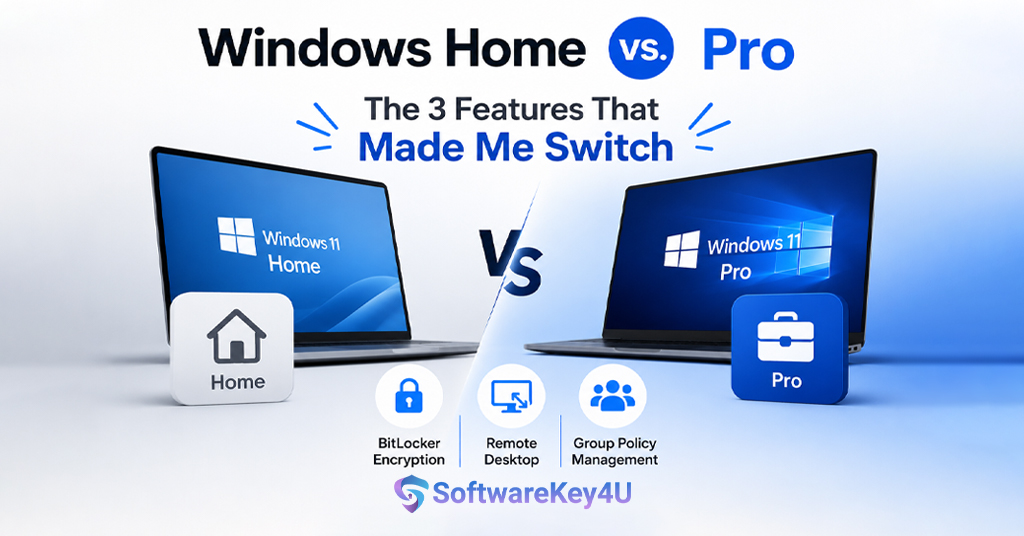
BitLocker Device Encryption: This tool protects your data. It encrypts your hard drive. If someone steals your laptop, they cannot read your files. This is crucial for business security.
-
Remote Desktop Host: This lets you connect to your computer from anywhere. You can work from home or on the road. It gives you flexibility.
-
Group Policy Management: This tool helps you control settings across many devices. You can enforce rules for your whole team. It makes management easier.
-
Windows Update for Business: This gives you control over updates. You can schedule them. You can defer them if needed. This prevents unwanted disruptions.
-
Hyper-V: This lets you run virtual machines. You can test software safely. You can run different operating systems.
-
Windows Sandbox: This is a safe space to run untrusted apps. It protects your main system from harm.
-
Azure AD Integration: This connects your devices to Microsoft’s cloud. It makes identity management simple.
-
Microsoft Intune Support: This helps you manage mobile devices. It is great for teams on the go.
These features make Windows 11 Pro a strong choice. They give you control and security. They help your business grow.
Windows 11 Business vs Pro: The Licensing Confusion
The Windows 11 Business vs Pro confusion comes from licensing. Microsoft uses different terms for different channels. When you buy a new PC, you might see “Windows 11 Business”. This is often an OEM license. It comes bundled with the hardware. It is a one-time purchase. You pay once and you own it. This is great for small businesses. You do not have recurring costs. Retail licenses also exist. You can buy a Windows 11 Pro license for about $200.
Upgrading from Home costs about $100. Volume licensing is another option. This is for larger companies. They need many licenses at once. They get special pricing. But for most small businesses, the OEM license works fine. It comes with your new computer.
It is simple and cost-effective. So when you compare Windows 11 Business vs Pro, know that the licensing is the same. The only difference is the label.
Windows 11 Pro vs Enterprise: What About the Bigger Edition?
Some people ask about Windows 11 Enterprise. This is a different beast altogether. Enterprise is for large organizations. It has more advanced security features. It offers deeper compliance controls. It gives IT teams central control over many devices. But here is the key point. Most small businesses do not need Enterprise. It is overkill. It is too expensive. It requires volume licensing. It often comes as a subscription. This adds ongoing costs.
Windows 11 Pro gives you what you need. It has essential tools like BitLocker and Group Policy. It supports remote work. It keeps your data safe. Enterprise adds extra layers. These are for highly regulated industries.
They are for companies with hundreds of devices. For your small business, Pro is the sweet spot. It balances features and cost. It gives you room to grow. So when you think about Windows 11 Business vs Pro, remember that Pro is enough. You do not need to jump to Enterprise.
Why Small Businesses Choose Windows 11 Pro
Small businesses love Windows 11 Pro for many reasons. Let us list them.
-
It is affordable: The cost is reasonable. You pay once and you are done.
-
It is secure: BitLocker and Defender protect your data. You get peace of mind.
-
It is manageable: Group Policy helps you control devices. You do not need a big IT team.
-
It is flexible: Remote Desktop lets you work anywhere. You are not tied to your desk.
-
It is professional: It looks and feels like a business tool. It impresses your clients.
-
It is scalable: It grows with your business. You can add more devices easily.
-
It is supported: Microsoft provides updates and help. You are not left alone.
-
It is compatible: It works with most business software. You avoid compatibility issues.
These reasons make Pro the top choice. It is no wonder that many experts recommend it. It solves real problems for real businesses. It helps you stay productive. It keeps your data safe. It saves you money in the long run. When you weigh Windows 11 Business vs Pro, Pro wins every time.
Security Comparison: Windows 11 Business vs Pro
Security is a top concern for every business. You need to protect your data. You need to protect your customers. Windows 11 Pro gives you strong security tools. BitLocker is a key feature. It encrypts your entire drive. If your laptop is lost or stolen, your data stays safe. Windows Defender Antivirus protects against malware. It runs in the background.
It catches threats before they cause harm. Windows Hello lets you sign in with your face or fingerprint. This is more secure than passwords. It is also faster and easier. Group Policy helps you enforce security rules. You can require strong passwords.
You can limit who can install software. These tools work together. They create a strong defense. They protect your business from cyber threats. When you compare Windows 11 Business vs Pro, security is not a concern. Pro has everything you need. It is a secure and reliable platform.
Management and Control: A Key Difference
Management is where Windows 11 Pro shines. It gives you control over your devices. Group Policy is a powerful tool. You can set rules for all your computers. You can enforce password policies. You can control update settings. You can restrict access to certain features. This saves you time. You do not have to configure each device manually.
You can also use Windows Update for Business. This lets you manage updates. You can choose when to install them. You can defer them if you are busy. This prevents unexpected restarts. It keeps your team productive. Mobile Device Management (MDM) is another feature. It works with Microsoft Intune.
You can manage smartphones and tablets. You can enforce security policies on all devices. This is great for remote teams. These management tools are not available in Windows 11 Home. They are exclusive to Pro. This is a big reason why businesses choose Pro. It makes IT management simple and efficient.
Performance and Productivity Features
Windows 11 Pro is built for speed and productivity. It has features that help you work faster. Snap Layouts help you organize your windows. You can arrange them in different patterns. This makes multitasking easier.
You can see multiple apps at once. You can drag and drop between them. This saves time and reduces clutter. Virtual Desktops let you create separate workspaces. You can have one for work and one for personal tasks. You can switch between them quickly.
This keeps you focused and organized. AI features are also available. They help you with tasks like captioning and background blur. They make your meetings more professional. They reduce distractions. These features are designed for business users.
They help you get more done in less time. They make your workday smoother and more enjoyable. When you compare Windows 11 Business vs Pro, productivity is a clear advantage for Pro.
Cost Analysis: Is Windows 11 Pro Worth It?
Let us talk about money. Windows 11 Pro costs more than Home. But is it worth the extra cost? For most businesses, the answer is yes. Let us break down the numbers. A new Windows 11 Pro license costs about $200. Upgrading from Home costs about $100. This is a one-time cost. You do not pay monthly fees. This is very affordable for a business tool. Now think about the benefits. Security features like BitLocker protect your data. A data breach can cost thousands of dollars. Pro helps prevent that. Management tools save you time. Time is money in business.
You do not have to hire a full-time IT person. You can manage everything yourself. This saves you salary costs. Productivity features help your team work faster. This means more output and more revenue. When you add it all up, Pro pays for itself. It is a smart investment. It protects your business. It makes your team more efficient. It gives you peace of mind. The Windows 11 Business vs Pro cost comparison is clear. Pro is worth every penny.
Common Misconceptions About Windows 11 Business
There are many myths about Windows 11 Business. Let us clear them up.
-
Myth 1: Windows 11 Business is a different edition. Fact: It is just a label for Windows 11 Pro.
-
Myth 2: Windows 11 Business has more features. Fact: It has the exact same features as Pro.
-
Myth 3: You need Windows 11 Business for compliance. Fact: Pro meets most compliance needs.
-
Myth 4: Windows 11 Business is more expensive. Fact: The pricing is the same as Pro.
-
Myth 5: You cannot use Windows 11 Pro for business. Fact: Pro is designed for business use.
These myths cause confusion. They make the Windows 11 Business vs Pro debate harder than it needs to be. The truth is simple. They are the same product. You can use Pro for all your business needs. It is a capable and reliable operating system. Do not let the name fool you. Focus on the features. Focus on the benefits. Choose Pro and move forward with confidence.
How to Get Windows 11 Pro for Your Business
Getting Windows 11 Pro is easy. There are several ways to do it. The simplest way is to buy a new computer. Many business laptops come with Pro pre-installed. This is called an OEM license. The cost is included in the price. You do not have to do anything extra. This is the most common method. Another way is to buy a retail license. You can purchase it from a store or online. It costs about $200. You get a product key. You can install it on any compatible computer.
You can also upgrade from Windows 11 Home. This costs about $100. You can do this through the Windows Store. It is quick and easy. You can also use volume licensing. This is for larger businesses. You get multiple licenses at a discount. This is great if you have many devices. For most small businesses, the OEM route is best. It is simple and cost-effective. You get Pro right out of the box. You can start working immediately.
Making the Right Choice for Your Small Business
So which one should you choose? The answer is clear. Choose Windows 11 Pro. It is the right choice for small businesses. It gives you security, management, and productivity features. It is affordable and easy to use. It scales with your business. It is the standard for business computing. Do not get confused by the Windows 11 Business vs Pro label. They are the same thing. Pro is the edition you need. It will serve you well for years to come. It will protect your data. It will help your team work better. It will give you peace of mind. Make the smart choice. Choose Windows 11 Pro for your business. You will not regret it.
Where to Buy Genuine Windows 11 Pro Licenses
When you are ready to buy, choose a trusted source. You want genuine licenses. You do not want to risk counterfeit products. One reliable option is softwarekey4u. They offer genuine software keys at competitive prices. They have a good reputation. They provide fast delivery. You can get your license quickly and start working. Buying from a trusted seller gives you peace of mind. You know you are getting a real product. You avoid activation issues.
You get full support from Microsoft. This is important for your business. You cannot afford downtime. You cannot afford security risks. So choose wisely. Choose a trusted partner like softwarekey4u. They make the process simple and safe.
Conclusion
The Windows 11 Business vs Pro question is a common one. Many small business owners get confused. But the answer is simple. There is no separate Windows 11 Business edition. It is just a label for Windows 11 Pro. Pro is the edition you need for your business.
It gives you powerful security tools like BitLocker. It gives you management tools like Group Policy. It gives you productivity features like Snap Layouts. It is affordable and easy to use. It is the standard for business computing.
Do not overthink this decision. Choose Pro and move on. Your business will benefit from it. Your team will be more productive. Your data will be safer. You will save time and money. The Windows 11 Business vs Pro comparison ends here. Pro is the winner.
It is the clear choice for small businesses. It meets all your needs. It gives you room to grow. It is a smart investment. So go ahead and make the switch. Get Windows 11 Pro for your business today. You will be glad you did. Your future self will thank you.
FAQ’s
Q1: Is Windows 11 Business the same as Windows 11 Pro?
Yes, they are the same. “Windows 11 Business” is just a label that Microsoft sometimes uses for Windows 11 Pro. There is no separate edition with that name. When you see “Windows 11 Business” on your computer, you are actually running Windows 11 Pro.
Q2: Which is better for a small business, Windows 11 Pro or Enterprise?
Windows 11 Pro is better for most small businesses. It has all the essential features like BitLocker, Group Policy, and Remote Desktop. Enterprise adds advanced features for large organizations with complex needs. It is more expensive and requires volume licensing. For a small business, Pro is the right choice.
Q3: Can I use Windows 11 Home for my business?
You can, but it is not recommended. Windows 11 Home lacks important business features like BitLocker, Group Policy, and domain join. These tools are essential for security and management. Using Home can put your business data at risk. It can also make management harder. It is better to invest in Pro.
Q4: How much does Windows 11 Pro cost?
A new Windows 11 Pro license costs about $200. Upgrading from Windows 11 Home costs about $100. These are one-time costs. You do not pay monthly fees. This makes Pro very affordable for small businesses.
Q5: Where can I buy a genuine Windows 11 Pro license?
You can buy from trusted retailers or online stores. One reliable option is softwarekey4u. They offer genuine licenses at good prices. Always buy from a trusted source. This ensures you get a real product. It also gives you access to Microsoft support.